HTML5 .js google hosted
html5shiv.googlecode.com/svn/trunk/html5.js
or simply copy the code below and paste it into your header.php
<!--[if lt IE 9]><script src="//html5shiv.googlecode.com/svn/trunk/html5.js"></script><![endif]-->

Hi guys, I have this problem during my WordPress coding journey. The `get_the_ID()` has conflict in nested `WP_Query` codes. On the first `WP_Query` loop, the ID for example is 20, then inside that loop I have another `WP_Query` (see the codes below) that makes the `WP_Query` codex more completed if you don’t code it right….
Watch One Piece Episode 787 English Subbed below. Video is coming Soon!!!
How Convert string with unwanted character to slug, proper name, etc.? Try this code using http://phptester.net/. // Example 1 function cleantitle($string){ $string = str_replace(' ', '-', $string); $string = preg_replace('/[^A-Za-z0-9\-]/', '-', $string); return preg_replace('/-+/', ' ', $string); } $str_1 = 'Menstruation_Sisters_-_14'; echo cleantitle($str_1); // output will be "Menstruation Sisters 14" // Example 2 function cleantitleslug($string){…
Option 1 add_filter( 'genesis_pre_get_option_site_layout', 'genesiscustomlayout' ); function genesiscustomlayout(){ $pageobj = get_queried_object(); $pageid = absint($pageobj->ID); $pagelayout = get_post_meta($pageid , "_genesis_layout" , true); return $pagelayout; } Option 2 This function is to forced your custom post type content layout to full width. Common post type is post, page, and product ( woocommerce plugin pages ) and etc….
Copy the codes below to your functions.php add_filter('rtmedia_plupload_files_filter', 'rt_custom_allowed_types', 10, 1); function rt_custom_allowed_types( $types ){ global $bp; if ( $bp->current_component == 'activity' && isset( $types[0] ) && isset( $types[0]['extensions'] ) ) { $types[0]['extensions'] = 'jpg,jpeg,png,gif'; } return $types; } For more information please read this article https://rtmedia.io/docs/developers/allow-custom-media-types/
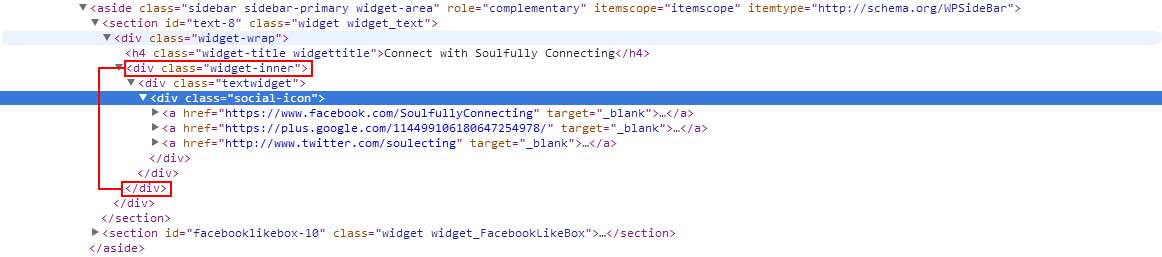
Re-register the default genesis sidebar into your function.php. See the image above for html output. genesis_register_sidebar( array( 'id' => 'sidebar', 'name' => __( 'Primary Sidebar', 'genesis' ), 'before' => '<div id="%1$s" class="widget %2$s">', 'after' => '</div></div>', 'before_title' => '<h4 class="widget-title widgettitle">', 'after_title' => '</h4><div class="widget-inner">' ) );