Background image file path css
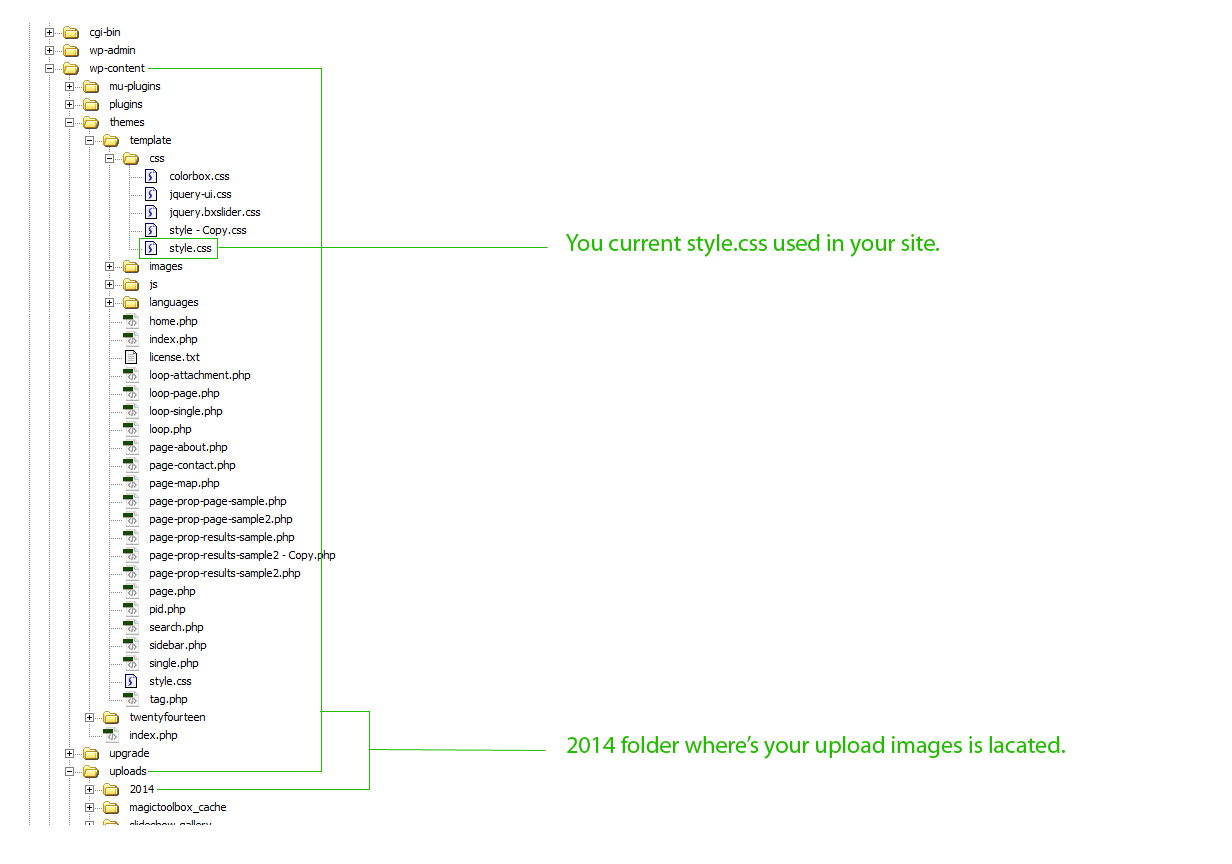
Make sure you have the same file path as the image below.
background-image css example :
div {
   background-image: url('../../uploads/2014/07/bg-css.jpg' );
}


function widget_first_last_classes($params) { global $my_widget_num; $this_id = $params[0]['id']; $arr_registered_widgets = wp_get_sidebars_widgets(); if(!$my_widget_num) { $my_widget_num = array(); } if(!isset($arr_registered_widgets[$this_id]) || !is_array($arr_registered_widgets[$this_id])) { return $params; } if(isset($my_widget_num[$this_id])) { $my_widget_num[$this_id] ++; } else { $my_widget_num[$this_id] = 1; } $class = 'class="widget-' . $my_widget_num[$this_id] . ' '; if($my_widget_num[$this_id] == 1) { $class .= 'first '; } elseif($my_widget_num[$this_id] == count($arr_registered_widgets[$this_id]))…
What’s up masters please support my Youtube channel. For this error please watch the video and you will get the right answer.
The7 social network share button open new window instead of new tab. Copy the codes below to your JS file. $('.soc-ico a' ).click(function(e){ e.preventDefault(); window.open(this.href, "myWindowName", "width=800, height=600"); });

Did you know Yonko Shanks has a son? Me? I don’t know about it, until I read this post http://otakukart.com/onepiece/one-piece-might-just-revealed-shanks-son/. As fun, I am very amazed and happy to know that he has a son. Yonko Shanks has a very mysterious character in one piece. Ok, to explain on you more, read this article http://otakukart.com/onepiece/one-piece-might-just-revealed-shanks-son/…
How to control the post displayed on a specific category? You can solve this problem by simply copy the codes below on your functions.php file. function category_blog_posts_per_page( $query ) { if ( is_admin() || ! $query->is_main_query() ){ return; } if( is_category( 1 ) ){ $query->set( 'posts_per_page', 15 ); } } add_action( 'pre_get_posts', 'category_blog_posts_per_page', 1 );
Disable ui tabs menu $("#tabs").tabs("option","disabled", [0, 1]); // Option 1 $( "#tabs" ).tabs( "disable", "#tabs-2" ); // Option 2 $( '#tabs li.disabled-tab' ).addClass( 'ui-state-disabled' ); // Option 3
Many thanks if you are so kind to fairly share this information.