Briefly unavailable for scheduled maintenance check back in a minute | XAMP | WordPress
What’s up masters please support my Youtube channel.
For this error please watch the video and you will get the right answer.

What’s up masters please support my Youtube channel.
For this error please watch the video and you will get the right answer.
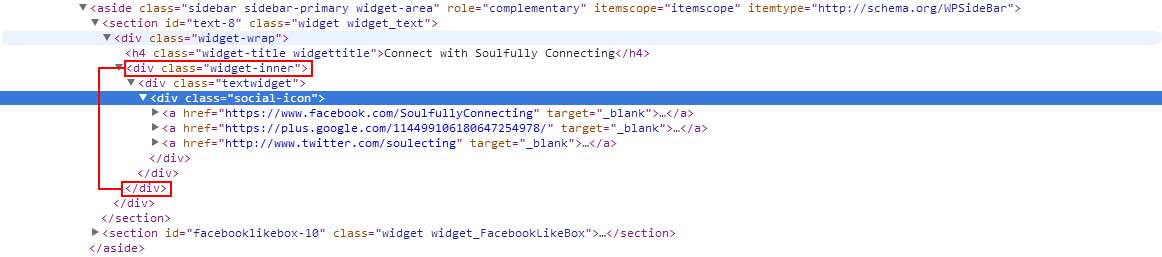
Re-register the default genesis sidebar into your function.php. See the image above for html output.

Warning: sprintf(): Too few arguments in \wp-admin\includes\class-bulk-upgrader-skin.php on line 152 error from TGM Plugin Activation. To fixed this error is just need to edit the files describe on the screenshot. To edit just fine the `skin_update_successful` just like the image below. Make sure to remove the `onclick=”%2$s”` codes on 2 elements. Make sure you are…
Having trouble on the auto filling the color of telephone number? Most common color is blue for the links. Here’s the solution below. Just copy and paste this inside to to your .
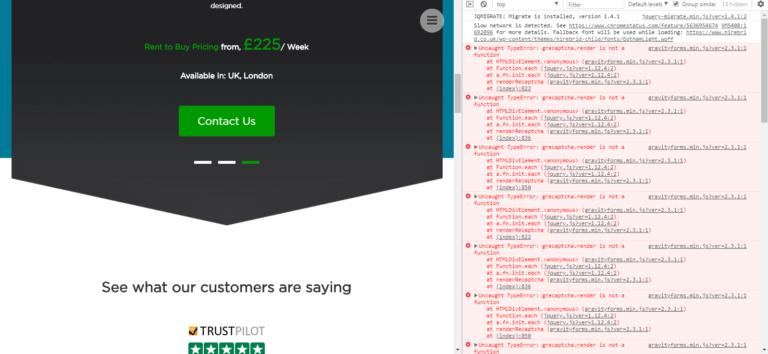
Uncaught TypeError: grecaptcha.render is not a function console error is showing if the recaptcha api.js is not enqueue or the `grecaptcha.render` is fire before the recaptcha api.js is being enqueue. See the JS library link below. I’m having this error when I use the Gravity Form captcha field. As I explained above, that is the…
How to increase PHP Max Input Vars? Most common errors I’ve encountered is when I’m adding an menu items in menu dashboard. Some hosting company is easy to fix, something like using php.ini, or .user.ini file. In my case I’m using WP Engine hosting company and I’ve tried this two and I guess its not…
Put this code to your .htaccess file. 2. Install WordPress Plugins Organizer.